

Guide: Oracle Simphony - API
How Do Core Concepts Map to Tenzo?
Key: ✅ Supported 🚸 Work in Progress ❌ Not Supported
 |
|
|---|---|
| Location | ✅ Location IDs |
| Order Type | ✅ Order Type |
| Revenue Center | ✅ Revenue Centers |
| Product Item | ✅ Menu Item |
| Product Category | ✅ Family Group |
| Product Division | ✅ Major Group |
| Tender Type | ✅ Tender Type |
| Employee | ✅ Employee |
| Customer | ❌ Not Supported |
| Discount | ✅ Discount |
| TicketItemDiscounts | ✅ |
| TicketDiscounts | ✅ Discount |
| TicketItemModifiers | ❌ Not Supported (modifiers come in as items) |
| Guest Count | ✅ Guest Count |
| Transaction length | ✅ Closing Date - Creation Date |
| KDS Bump Time | ❌ Not Supported |
| Ticket Voids | ✅ Canceled |
| Ticket Item Voids | ❌ Not Supported |
| Table | ✅ Table |
| Service Charge | ✅ Service Charge |
| Tips | ❌ Not Supported |
| Price | ✅ Price from sales items |
| Menu Item Visibility | ❌ Not Supported |
| Menu Item Size | ❌ Not Supported |
Data Ingestion
| Real-time optionally available? | ❌ |
| Default polling frequency | Hourly for sales; menu, employees, discounts and other reference data once a day overnight |
| Data retrieved on each poll | Yesterday (previous business day only) |
| Historical data | Back to the 'Start date' entered when the integration is connected (set this to the first day you have data in Simphony) |
| Data received per day or continuous | Per Day |
Requirements
Tenzo uses Oracle Reporting and Analytics' Business Intelligence API. Therefore the requirements for the Oracle Simphony - API integration are:
- Oracle Reporting and Analytics version 20.1 or higher.
The version number can be found at the bottom left of your Reporting & Analytics WebApp:

How Do I Compare Simphony Data to Data in Tenzo?
In Simphony we match to the Net Sales report.
Once logged in, navigate to Library and search for Net Sales.
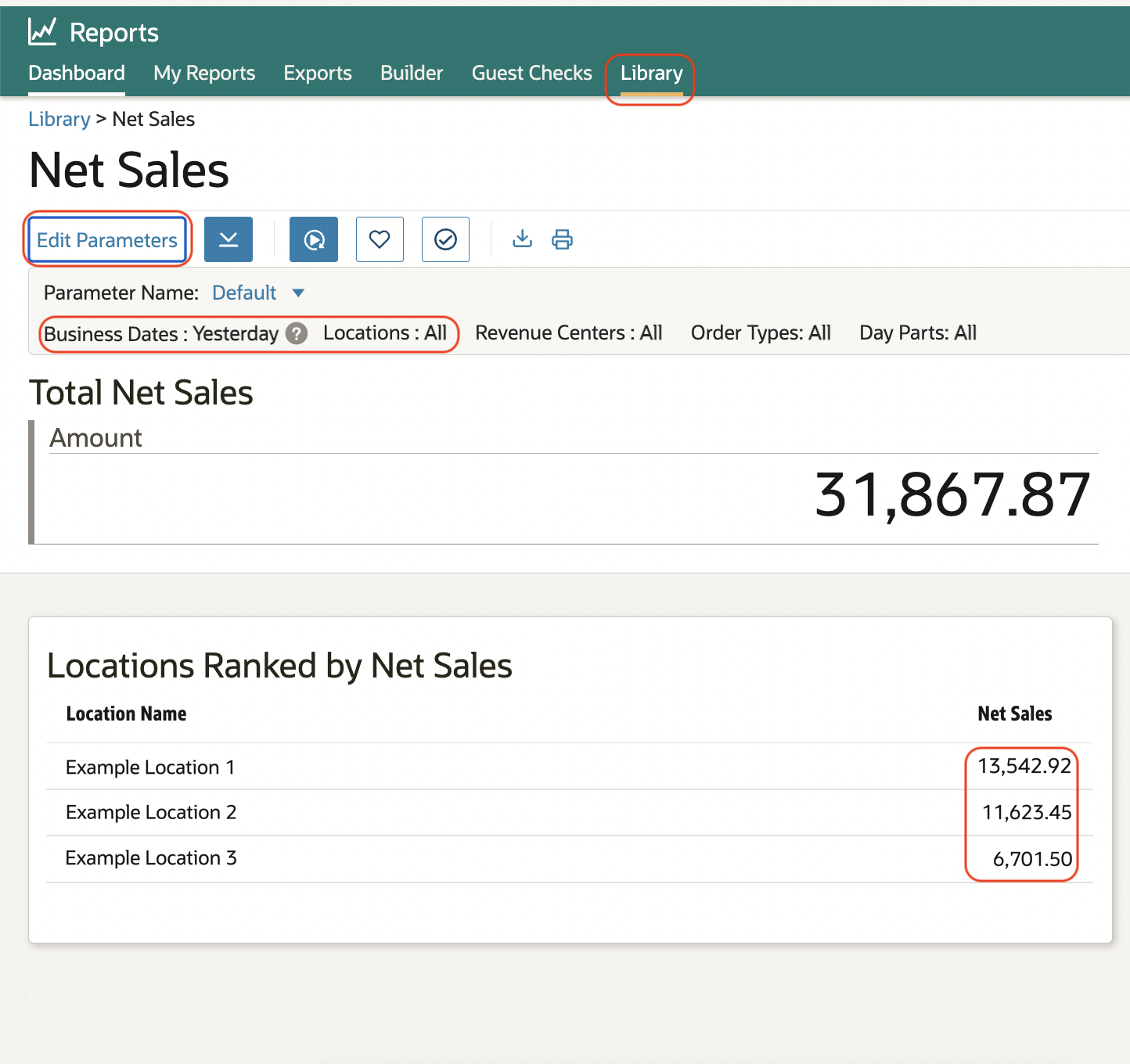
Once here, the 'Edit Parameters' button can be used to choose the date and locations.
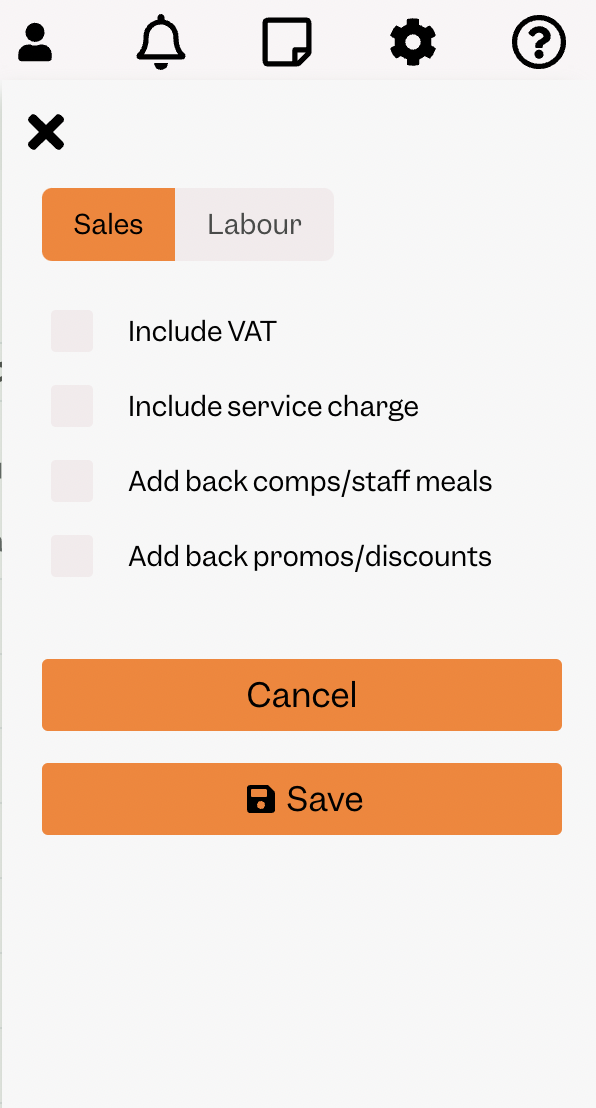
In Tenzo, all settings must be unchecked. These can be found by clicking on the settings icon:
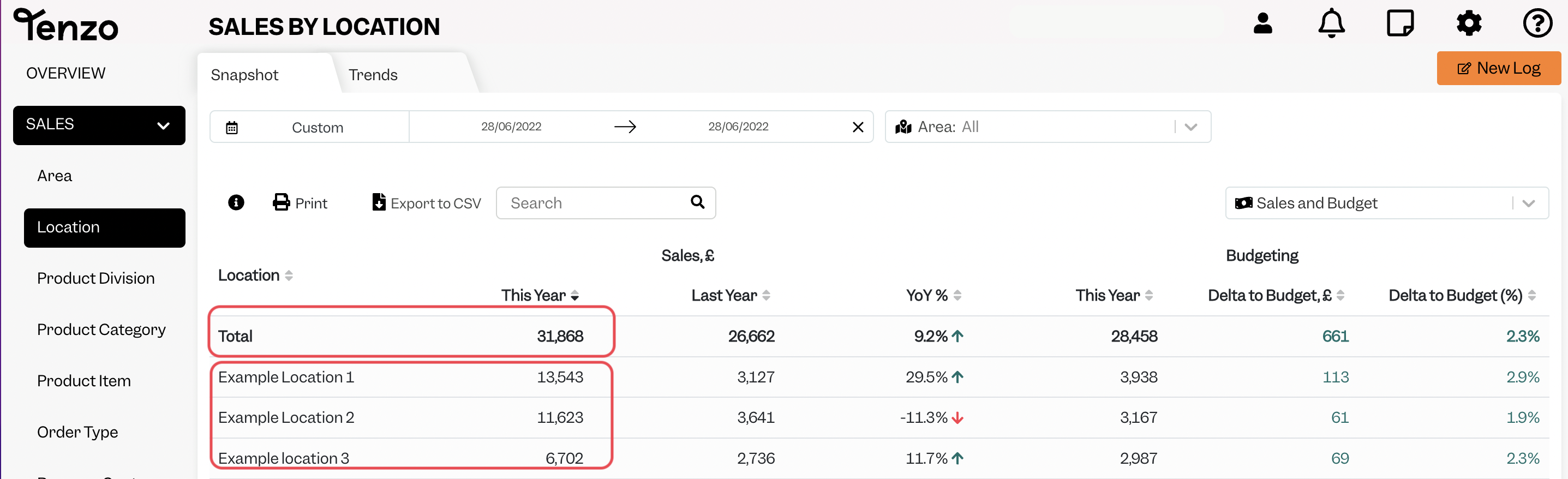
The Simphony numbers will then match the numbers in the Sales → Location module within Tenzo:
Exceptions
- 'Charged Tips' appear on the 'Service Charge' report in Simphony, therefore they appear as a service charge in Tenzo. This means that the 'Tips' card on the Employee Dashboard will not contain this data.
- Tenzo displays data on the day the transaction is opened. Occasionally there may be transactions which are closed a few days later so there could be a mismatch in this instance, although this is rare.
- Simphony Guest Checks report will show the total payment amount of the Check if a Check is split between guests. This can lead to Tenzo and Simphony mismatching if comparing payments to Guests Checks.
- Tenzo works out net (ex-VAT) prices from the tax rate on each item's tax class in Simphony. If a tax class has no rate set, Tenzo instead uses the tax amount Simphony recorded on each line, so net sales still exclude VAT.