

Guide: MarketMan
How Do Core Concepts Map to Tenzo?
Key: ✅ Supported 🚸 Work in Progress ❌ Not Supported
 |
|
|---|---|
| Location | ✅ Locations/Chain Buyers |
| Vendor | ✅ Vendor |
| Division | ✅ Division |
| Category | ✅ Category |
| Item | ✅ Items |
| Purchases | ✅ Purchases (Invoice Date) & Transfers |
| Actual Usage | ✅ Actual Usage |
| Theoretical Usage | ✅ Theoretical Usage |
| Waste | ✅ Waste |
| Menu Items | ✅ |
| Menu Item Costs (for Menu Profitability) | ✅ |
| Transfers | ✅ |
Data Ingestion
| Real-time optionally available? | ❌ |
| Default polling frequency | Every 24 hours |
| Data retrieved on each poll | Last 30 days and today |
| Historical data | All data since MarketMan began (2013/01/01), unless a later start date is set |
How Do I Compare MarketMan Data to Data in Tenzo?
Purchases:
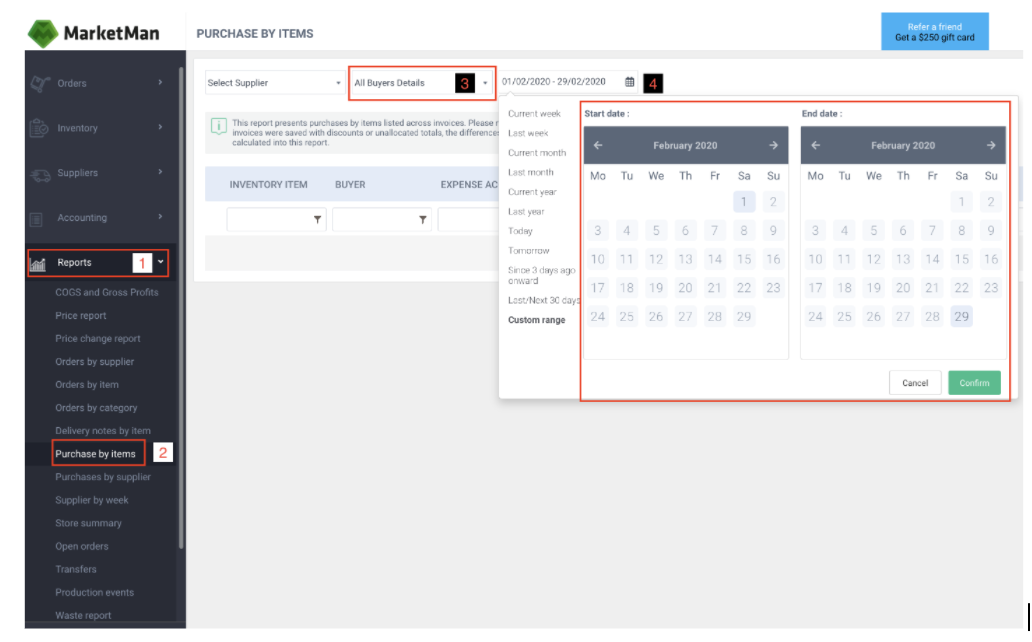
- Go to Reports (1) > Purchase by items (2) > if it’s not in the side-bar use this link: https://buyer.marketman.com/Views/Reports/InvItemDocsSummary
- To compare the total, select All Buyers Details (3), or select a location from the drop-down menu
-
Select the same date range from the date picker (4) as you did in Tenzo
- Scroll to the bottom and compare the total value in the cost column
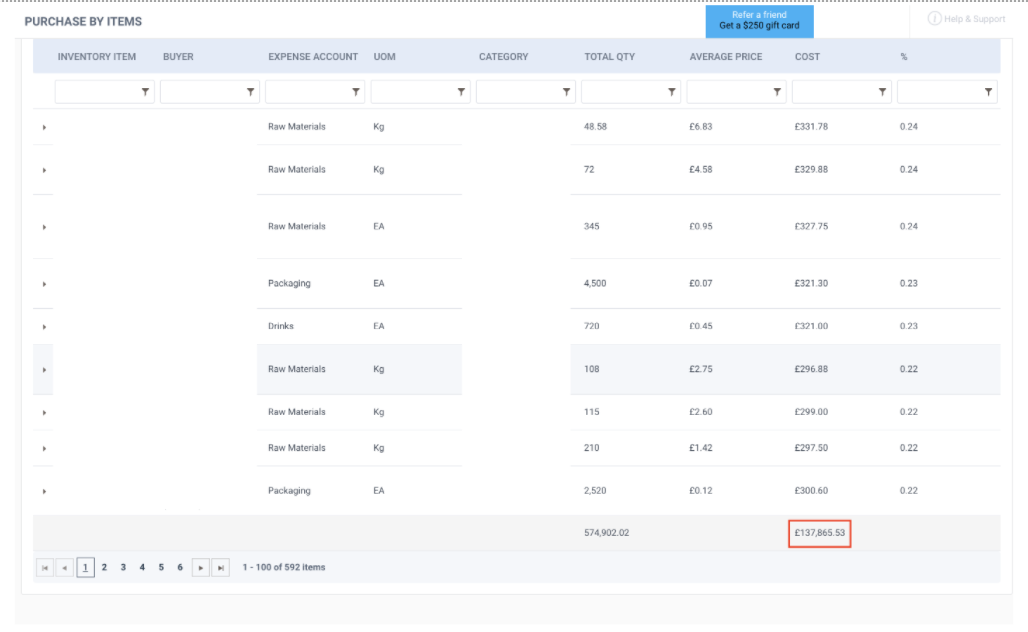
Note: Tenzo shows purchases based on the Document Date in MarketMan.
Actual vs Theoretical
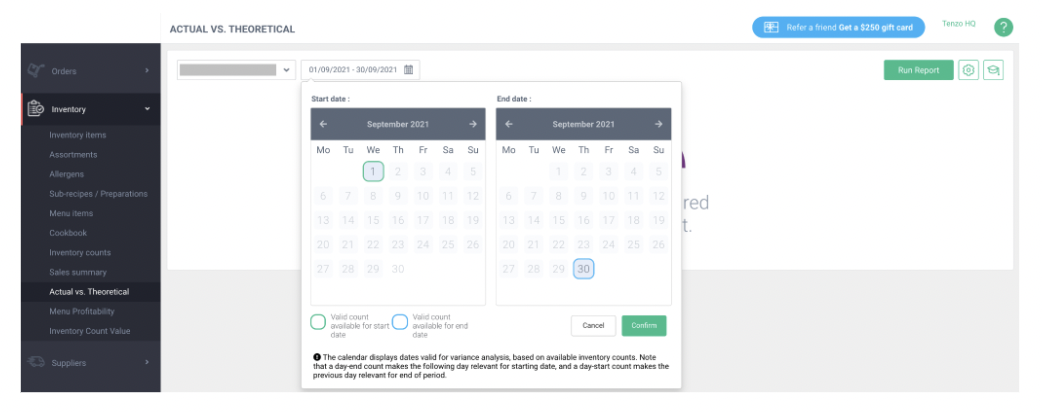
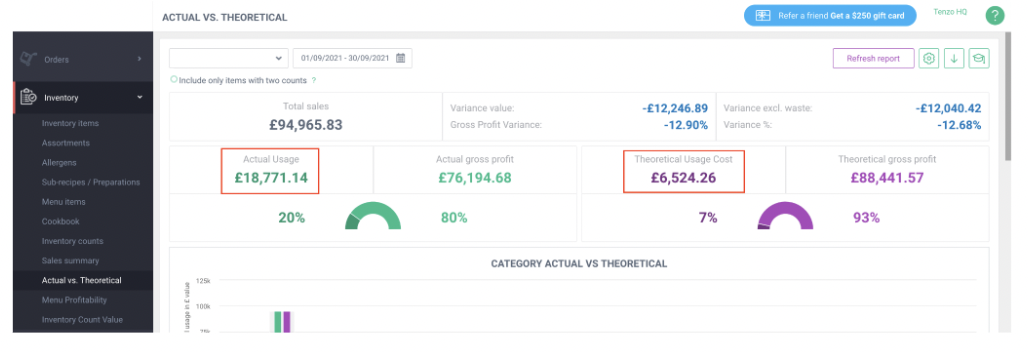
- It’s not always possible to see the exact same numbers in MarketMan as in Tenzo, as Tenzo retrieves the AvT values separately for every item, depending on when each item was counted.
- The 'Include only items with two counts' button should not be checked.
Useful Notes Regarding AvsT
When checking, please keep in mind the below points:
- We only show items that have the term ‘Received’, confirming goods have been sent to the site. Any other wording, for example ‘Viewed by supplier’ will not be shown in Tenzo
- With Inventory Transfers, Tenzo only shows products under the ItemType ‘Inventory Item’. Any items such as ‘Sub-Recipe’ or ‘Menu Item’ will not show, meaning discrepancies.
- When a site is stock counting, we show for the period items from the CountStartDate to CountEndDate, so if thse fall out of the period required, the figures will be inflated accordingly
Wastage
Please use the Reports → Waste Report in MarketMan. This can be compared with the Waste/Recorded Waste in Tenzo.
Exceptions
-
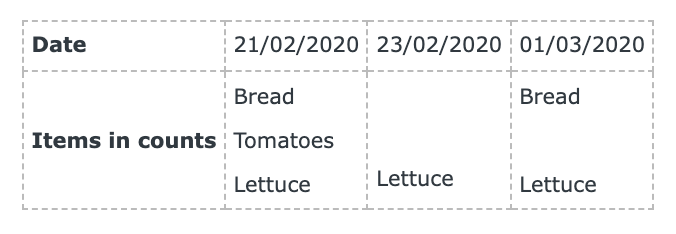
AvT matches counts from A to B and B to C but not A to C. In the below example, for:
- Bread we’d get AvT from 21/02/2020 to 01/03/2020,
- Tomatoes we’d get nothing (unless there was a future count after 01/03/2020), and
- Lettuce we’d get 21/02/2020 to 23/02/2020, and 23/02/2020 to 01/03/2020.
- AvT report = COGS report (Both AvT and COGS include transfers).
- Some item purchases appear in Tenzo but not in MarketMan.
- Purchases as a % sales show at the location level but not at the category item level.
- Deleted vendors/docs (don’t appear in MarketMan front-end, do appear in API/Tenzo).
- Currently we do not support combinations of ingredients.
- Tenzo uses historical item prices for Menu Profitability, whereas MarketMan always uses the latest item prices in their Menu Profitability reporting.
If you have further questions about how your MM data in Tenzo please don't hesitate to contact support@gotenzo.com