

Guide: Rotaready
How Do Core Concepts Map to Tenzo?
Key: ✅ Supported 🚸 Work in Progress ❌ Not Supported
 |
|
|---|---|
| Location | ✅ Locations (entities) |
| Shift (actual) | ✅ Shifts (Signed Off) |
| Shift (planned) | ✅ Shifts |
| Hours | ✅ Hours |
| Salaried workers | ✅ Salary from Pay |
| Employee | ✅ Staff |
| Role | ✅ Positions |
| House Part | ✅ Staff Groups |
| Sales Forecast | ✅ Forecast (Cost Control) — optional |
| Overheads | ✅ Flat percent |
| Holiday | ✅ Flat percent (accrual rate) |
| Breaks | ✅ Unpaid |
| Overtime | ❌ Not Supported |
| Exception costs / one-off costs | ✅ |
| Borrowed/loaned employees | ✅ |
| Employer taxes | ✅ Planned: estimated from National Insurance thresholds for UK sites. Actual: Rotaready's own employer tax figure |
| Pension | ✅ Planned: estimated (3% auto-enrolment above £120/week, UK sites). Actual: included in Rotaready's employer tax |
Data Ingestion
| Real-time optionally available? | ✅ Optional: today's shifts every 20 minutes, from clock-ins and clock-outs |
| Default polling frequency | Every 8 hours |
| Data retrieved on each poll | Back 4 weeks, forward 2 weeks |
| Historical data | All data since you started using the system |
Importing Rotaready's Sales Forecast (Optional)
As well as labour data, Tenzo can pull Rotaready's own sales forecast in — the same "Total Sales" forecast figure shown on Rotaready's Cost Control page.
It is off by default and opt-in per business. To enable it, during setup map each Rotaready venue to its Tenzo location — Rotaready reports the forecast on each venue's "Management" entity, so only mapped venues are imported. The forecast comes through at daily granularity (one value per location per day), and is refreshed on each poll for the upcoming days alongside the labour data.
How Do I Compare Rotaready Data to Data in Tenzo?
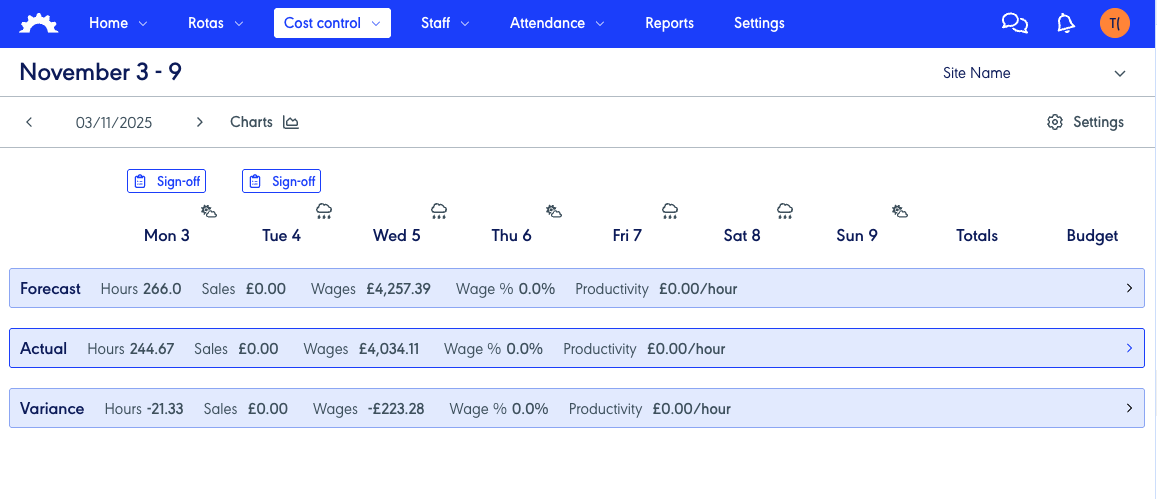
The new way is to use the Cost Control report on RotaReady and match the confirmed shifts cost there - https://wfm.rotaready.com/cost-control
We can use this for both forecast data (This is the costs from when they first published the rota, not with any changes they make once published) and for Actual costs (This is where and when they sign off the rota).
Please ensure that when you go to this page, you are comparing to the correct values (To confirm this, close all blue bars down, and then open what you require):
Exceptions
You cannot compare past planned shifts with the labour export.