
Guide: 7shifts
How Do Core Concepts Map to Tenzo?
Key: ✅ Supported 🚸 Work in Progress ❌ Not Supported
 |
|
|---|---|
| Location | ✅ Location |
| Shift (actual) | ✅ Time Punch |
| Shift (planned) | ✅ Shift |
| Hours | ✅ Hours |
| Salaried workers | ✅ Salaried workers |
| Employee | ✅ User |
| Role | ✅ Role |
| House Part | ✅ Department |
| Overheads | ✅ Compliance exception pay from 7shifts |
| Holiday | ❌ Not Supported |
| Breaks | ❌ Not Supported |
| Overtime | ✅ Supports both hours and costs |
| Exception costs / one-off costs | ✅ Exceptions |
| Borrowed / loaned employees | ❌ Not Supported |
Data Ingestion
| Real-time optionally available? | ✅ |
| Default polling frequency | Every 8 hours |
| Data retrieved on each poll | This week Forward two week Back two weeks |
| Historical data | All data since you started using the system |
How Do I Compare 7shifts Data to Data in Tenzo?
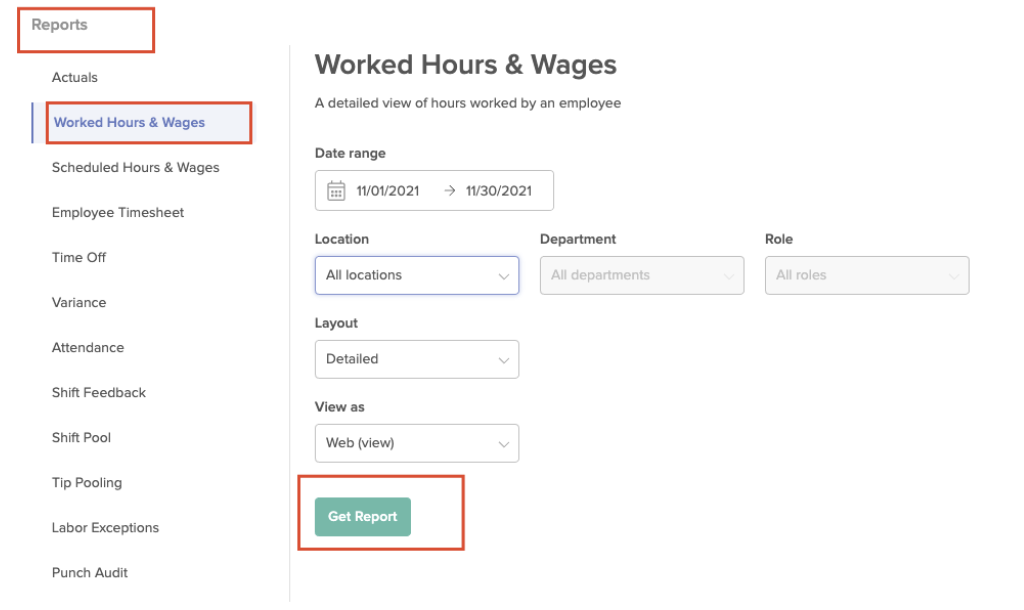
In 7shifts, navigate to Report > Worked Hours & Wages
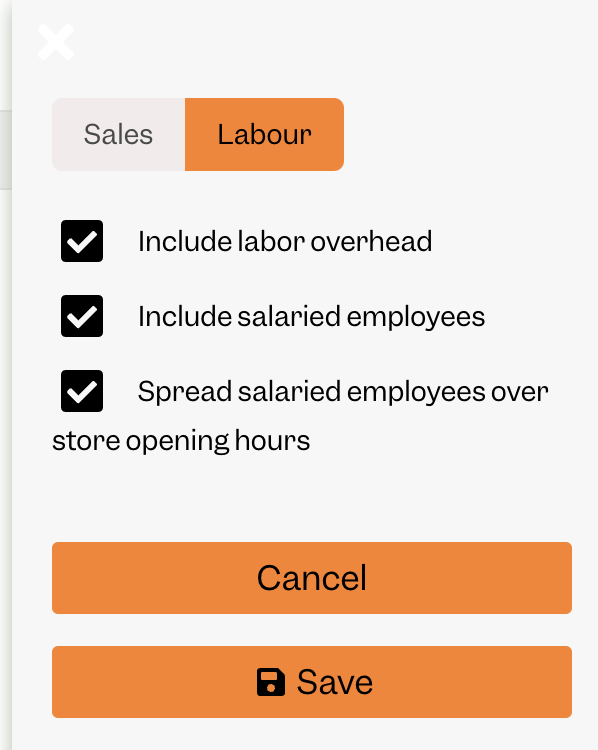
In Tenzo settings, click Labour and check the following - you do need to include overhead to match
Exceptions
if you have set an additional % overhead in Tenzo, you’ll need to subtract this from the Tenzo number to match 7shifts.
While we can get exception costs and overtime by employees, we are not always able to allocate them to specific hours in the day