

Guide: Toast (Labor)
How Do Core Concepts Map to Tenzo?
Key: ✅ Supported 🚸 Work in Progress ❌ Not Supported
 |
|
|---|---|
| Location | ✅ Locations |
| Shift (actual) | ✅ Time Entry |
| Shift (planned) | ✅ Scheduled Shifts |
| Salaried workers | ❌ Not Supported |
| Employee | ✅ Employee |
| Role | ✅ Job |
| House Part | ❌ Not Supported |
| Overheads | ✅ Flat % defined in Tenzo |
| Holiday | ❌ Not Supported |
| Breaks | 🚸 Work in Progress |
| Overtime | ✅ Overtime |
| Exception costs / one-off costs | ❌ Not Supported |
| Borrowed / loaned employees | ❌ Not Supported — hours count at the location where the employee clocked in |
Data Ingestion
| Real-time optionally available? | ❌ |
| Default polling frequency | Every 8 hours |
| Data retrieved on each poll | Back two weeks, forward two weeks (including planned shifts) |
| Historical data | All data since your first order in Toast |
| Business date cutoff time is determined by the integration or Tenzo | Tenzo |
How Do I Compare Toast Data to Data in Tenzo?
Matching Hours and Costs
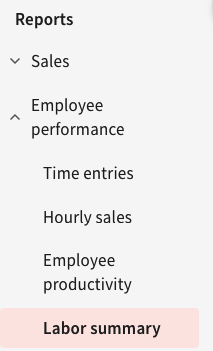
Within Reports, you need to find the "Labour Summary":
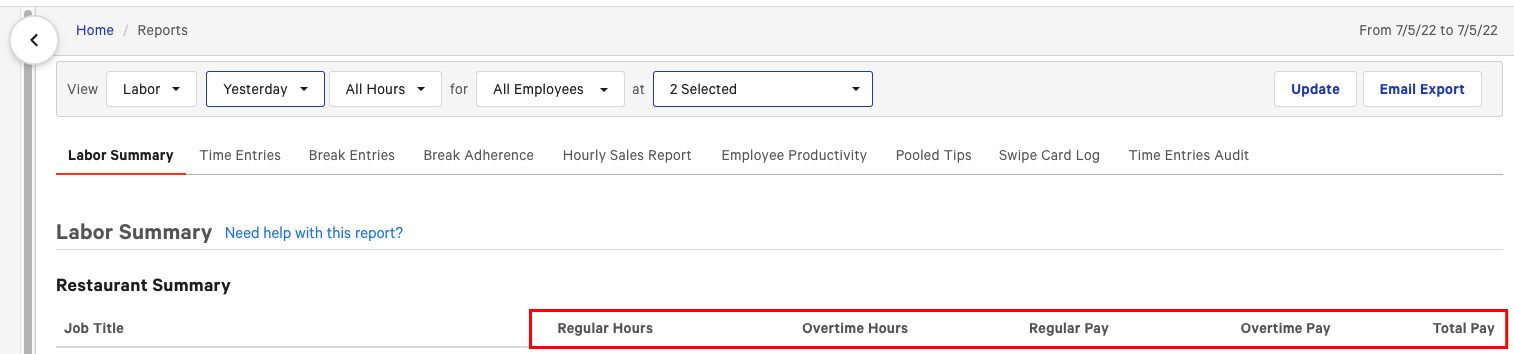
Then you can compare these columns to Tenzo:
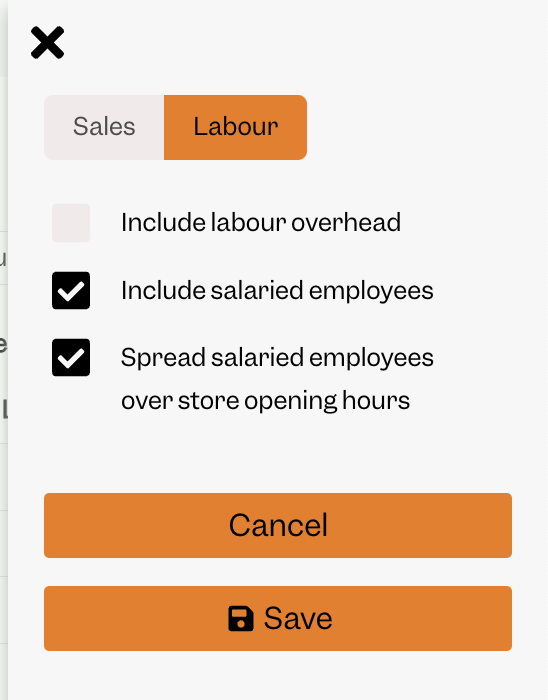
Note: you'll need to make sure you are not including the flat percentage Tenzo adds for overhead i.e. make sure this is not checked:
Toast Sales
If you're interested in seeing your sales data from Toast in Tenzo then we also have a separate Tenzo subscription for this! Please see the Toast Sales guide and contact support@gotenzo.com to discuss this with your Customer Success Manager.
Exceptions
Planned shifts and unpaid breaks. Tenzo brings in your Toast schedule (scheduled shifts) for planned hours and cost. Toast's scheduled shifts cover the full clock-in to clock-out span and do not record an unpaid break, so planned hours are gross. If you also use a separate scheduling tool that deducts an unpaid break from each shift, Tenzo's planned hours and cost will sit slightly above that tool's figures by the length of those breaks. Actual (worked) hours are unaffected.