

Guide: Toast (Sales)
How Do Core Concepts Map to Tenzo?
Key: ✅ Supported 🚸 Work in Progress ❌ Not Supported
 |
|
|---|---|
| Location | ✅ Location |
| Order Type | ✅ Dining Options |
| Revenue Center | ✅ Revenue Center |
| Product Item | ✅ Menu Item |
| Product Category | ✅ Menu Group (within a Sales Category) |
| Product Division | ✅ Sales Category |
| Tender Type | ✅ Payment Type |
| Employee | ✅ Server (Employee) |
| Customer | ✅ Customer ID |
| Discount | ✅ Discount |
| TicketItemDiscounts | ✅ Applied Discounts |
| TicketDiscounts | ❌ Only items |
| TicketItemModifiers | ✅ Modifiers |
| Guest Count | ✅ Guests |
| Transaction Length | ✅ Closed - Created |
| KDS Bump Time | ❌ Not Supported |
| Ticket Voids | ✅ Deleted or Voided |
| Ticket Item Voids | ✅ Deleted or Voided (or check voided) |
| Table | ✅ Table |
| Service Charge | ✅ Service Charges |
| Tips | ✅ Tips* |
| Price | ✅ |
| Menu Item Visibility | ❌ Not Supported |
| Menu Item Size | ❌ Not Supported |
Data Ingestion
| Real-time optionally available? | ✅ |
| Default polling frequency | Every 20 minutes (today and yesterday), plus a nightly 12am-4am re-pull of the last 7 days |
| Data retrieved on each poll | Today and yesterday |
| Historical data | All data since you started using your POS |
| Business date cutoff time is determined by the POS or Tenzo | By the POS (Toast business date) |
How Do I Compare Toast Data to Data in Tenzo?
Within Toast, you can see Net Sales within the "Sales Summary" report:
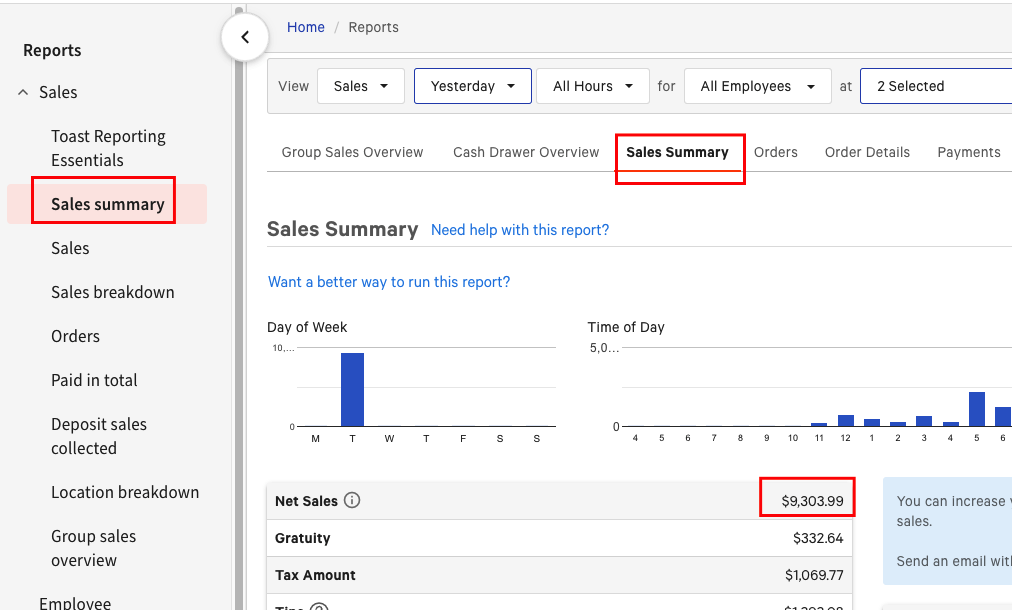
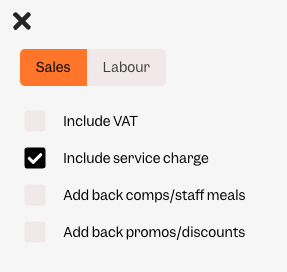
This will match the value in Tenzo without tax but with service charge i.e.:
Toast Labour
If you're interested in seeing your labour data from Toast in Tenzo then we also have a separate Tenzo subscription for this! Please see the Toast Labor guide and contact support@gotenzo.com to discuss this with your Customer Success Manager.
Exceptions
- Product Category is taken from the most recent menu, so it may show 'Not available' for items whose Menu Group in Toast has since been archived (no longer exists in the current menu) or was missing from the menu at the time of the transaction.
- Product Division is taken from Toast's Sales Categories, so it resolves even when the Sales Category had not yet been added to a published menu when the sale was made. A division only shows 'Not available' if its Sales Category has been deleted from Toast entirely.
- There may be a difference in refunds between Toast and Tenzo. This is because Toast shows the gross refunded amount removed from all values, even if the report you are viewing is net sales. However in Tenzo, we break it down so that the tax and service charge are refunded separately, so that part of the refund is accounted for when those settings are set accordingly.