

Guide: Access People / Selima
How Do Core Concepts Map to Tenzo?
Key: ✅ Supported 🚸 Work in Progress ❌ Not Supported
 |
|
|---|---|
| Location | ✅ Section |
| Shift (actual) | ✅ Shift |
| Shift (planned) | ✅ Shift (forecast) |
| Hours | ✅ Hours |
| Salaried workers | ✅ Salaried workers |
| Employee | ✅ Employee |
| Role | ✅ Post |
| House Part | ✅ Sub-section |
| Overheads | ✅ Exact match / Flat percent |
| Holiday | ✅ Can be either accrual based, or registering cost when taken |
| Breaks | ✅ Post |
| Overtime | ❌ Not Supported |
| Exception costs / one-off costs | ✅ Adjustments |
| Borrowed / loaned employees | ✅ Borrowed employees |
Data Ingestion
| Real-time optionally available? | ❌ |
| Default polling frequency | Every 20 minutes (Tenzo checks for new Selima report emails) |
| Data retrieved on each poll | The rota week(s) covered by each scheduled Selima Rota Report email |
| Historical data | Only the periods covered by reports emailed to Tenzo; to backfill, re-send the historical reports |
Optional: Match Tenzo's Wage Cost Exactly to Selima
By default Tenzo calculates Gross Pay, Employer NI and Holiday Accrual using UK statutory rates. This is normally accurate but can differ from Selima's own Wage Cost figure by a few percent per site. To make Tenzo's per-site-per-day Wage Cost match Selima's exactly, schedule a customised version of the standard Rota Financial Report (Day) in Selima to email Tenzo each day. Once it arrives, Tenzo uses Selima's numbers as the source of truth and adjusts each shift accordingly.
One-time setup in Selima (your Selima admin or your Tenzo CSM):
- In Selima, locate the standard Rota Financial Report (Day) report.
- Use Manage → Duplicate to create a customer-specific copy. Name it something like
Tenzo_RotaFinancial_Day_<CustomerName>. - Open the duplicate in the Stimulsoft designer and append the following columns to the DataBand: Gross Pay, Holiday Accrual, NI, Wage Cost Actual — each bound to its matching field under
RotaFinancial.Rota. Add matching static text headers above each column. Save. - Open the duplicate's Schedule editor and configure:
- Output Format: XLSX
- Email Template: Tenzo Rota Report
- Recipient:
incomingdata@gotenzo.com - Cadence: Daily, 05:00 (covers the previous calendar week)
- Set the report's Dates variable defaults to
Today.AddDays(-7)(From) andToday.AddDays(-1)(To) and uncheck Request from User so the report runs without prompting. - Save the schedule.
From the first day onwards, Tenzo's per-site-per-day Wage Cost will match Selima's exactly. Gross Pay, Holiday Accrual, and NI each independently match Selima's reported value; any remaining difference (overtime, adjustments) is captured per shift in proportion to minutes worked.
Note: Matching at the individual employee level is not yet supported. The daily report matches Selima at site-day totals; small differences may remain at the per-employee level until per-employee data can also be sent through.
How Do I Compare Access Data to Tenzo?
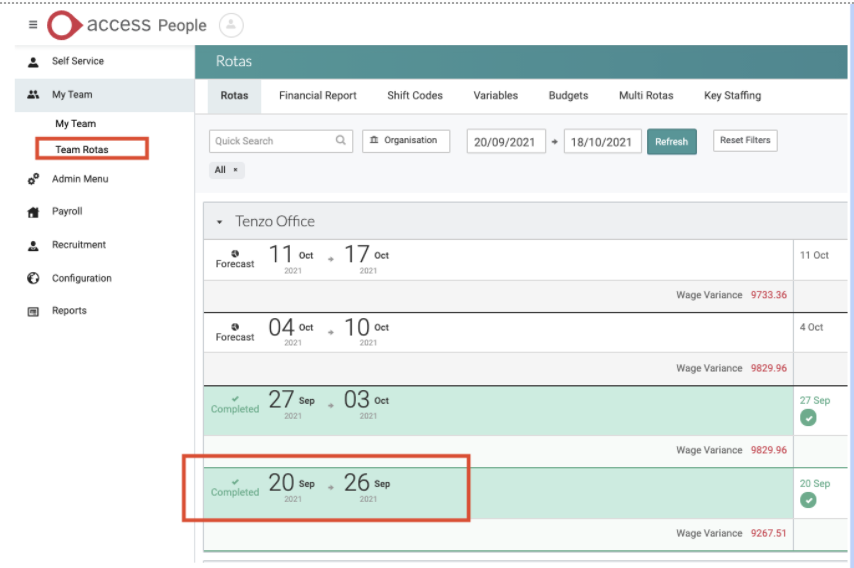
Navigate to an individual rota:
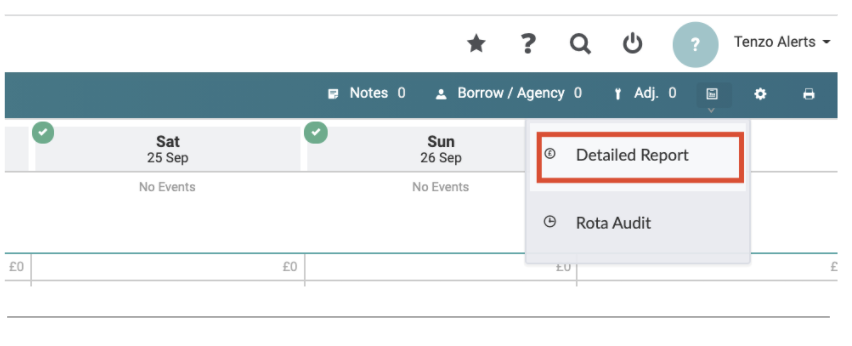
Select the detailed report in the top-left:
Match the following columns with Tenzo:

Exceptions
- Not able to get adjustments to HOURS
- ‘Meals and Accommodation’ cost adjustments are not supported
- The cost or the HOURS for the holiday shifts are not included
- Cash adjustments are charged to an employee’s home location and therefore Tenzo will not show a borrowed employee who has cash adjustments in the borrowed location’s labour cost.
- Cash adjustments might cause a small increase in the employee’s fully loaded cost.
- When the holiday is on the same day as a shift, the holiday will get counted as a shift on these days (both hours and cost, even when accruing for a holiday).