

Guide: Lightspeed R Series
How Do Core Concepts Map to Tenzo?
Key: ✅ Supported 🚸 Work in Progress ❌ Not Supported
 |
|
|---|---|
| Location | ✅ Shop |
| Order Type | ❌ Not Supported |
| Revenue Center | ✅ Register |
| Product Item | ✅ Item |
| Product Category | ✅ Category (second level one) |
| Product Division | ✅ Category (the top level one) |
| Tender Type | ✅ Payment Type |
| Employee | ✅ Employee |
| Customer | ✅ Customer |
| Discount | ✅ Discount |
| TicketItemDiscounts | ✅ Discount |
| TicketDiscounts | ❌ Not Supported |
| TicketItemModifiers | ❌ Not Supported |
| Guest Count | ❌ Not Supported |
| Transaction length | ✅ Complete Time - Create Time |
| KDS Bump Time | ❌ Not Supported |
| Ticket Voids | ✅ Void |
| Ticket Item Voids | ❌ Not Supported |
| Table | ❌ Not Supported |
| Service Charge | ❌ Not Supported |
| Tips | ✅ Tip |
| Price | ❌ Not Supported |
| Menu Item Visibility | ❌ Not Supported |
| Menu Item Size | ❌ Not Supported |
Data Ingestion
| Real-time optionally available? | ✅ |
| Default polling frequency | Hourly for sales; categorical data (shops, registers, categories/items, employees, payment types, discounts) refreshed daily |
| Data retrieved on each poll | Today and yesterday |
| Historical data | Full history from the time you started using Lightspeed |
| Business date cutoff time is determined by the POS or Tenzo | Tenzo |
How Do I Compare Lightspeed R Series Data to Data in Tenzo?
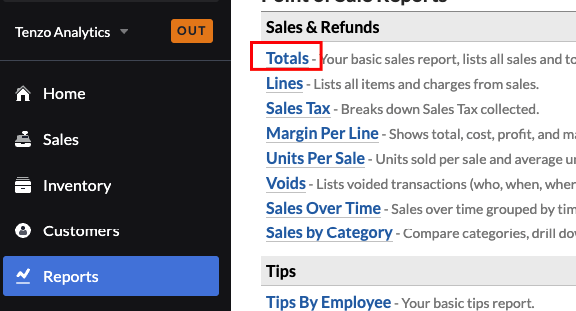
Go to Reports -> Totals:
Then look at either :
a) Subtotal - Discounts
b) Total w/ Tax
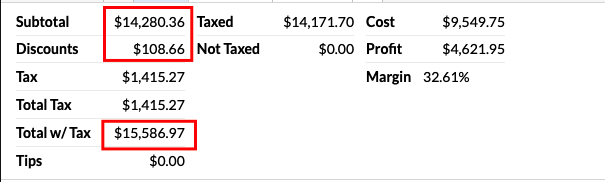
(b) may be off by very small amounts due to rounding as explained below.
Exceptions
Due to small rounding errors - tax in Lightspeed R series on the items does not always sum to the tax on the transactions. Given we calculate everything from the item level - this can result in very small rounding errors. (typically cents/pennies)