
Guide: Restaurant 365
How Do Core Concepts Map to Tenzo?
Key: ✅ Supported 🚸 Work in Progress ❌ Not Supported
 |
|
|---|---|
| Location | ✅ Location |
| Vendor | ✅ Company |
| Category | ✅ Two levels. Items use their R365 category (Category 1 › Category 2, e.g. Food › Grocery). Expense & non-item GL postings are grouped by GL account under its P&L section (e.g. COGS - Food › Purchases - Wine). |
| Item | ✅ Item |
| Purchases | ✅ Purchases (Stock Period Date) — Taken from Stock Period Items -> OrderQty |
| Actual Usage | ❌ Not Supported |
| Theoretical Usage | ❌ Not Supported |
| Recorded Wastage | ❌ Not Supported |
| Transfers | ❌ Not Supported |
| Menu Items | ❌ Not Supported |
| Menu Item Costs | ❌ Not Supported |
Data Ingestion
| Real-time optionally available? | ❌ |
| Default polling frequency | Every 24 hours, plus a weekly catch-up run |
| Data retrieved on each poll | Last 7 days on the daily run; last 30 days on the weekly run |
| Historical data | All data since your first transaction in R365 |
How Do I Compare R365 Data to Data in Tenzo?
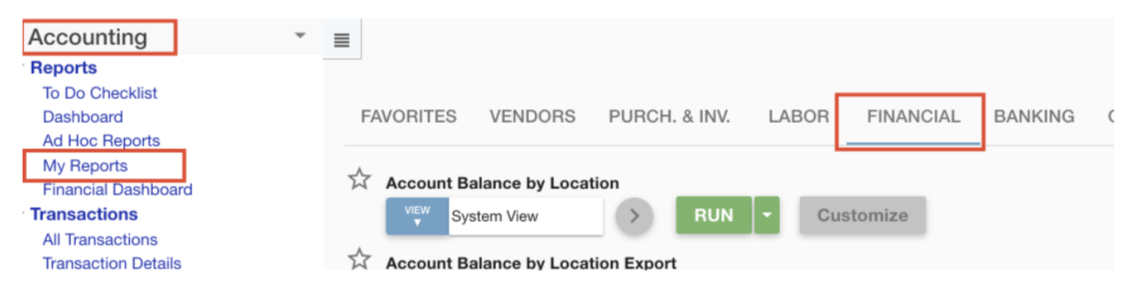
Navigate to the financial reports within Accounting > My Reports:
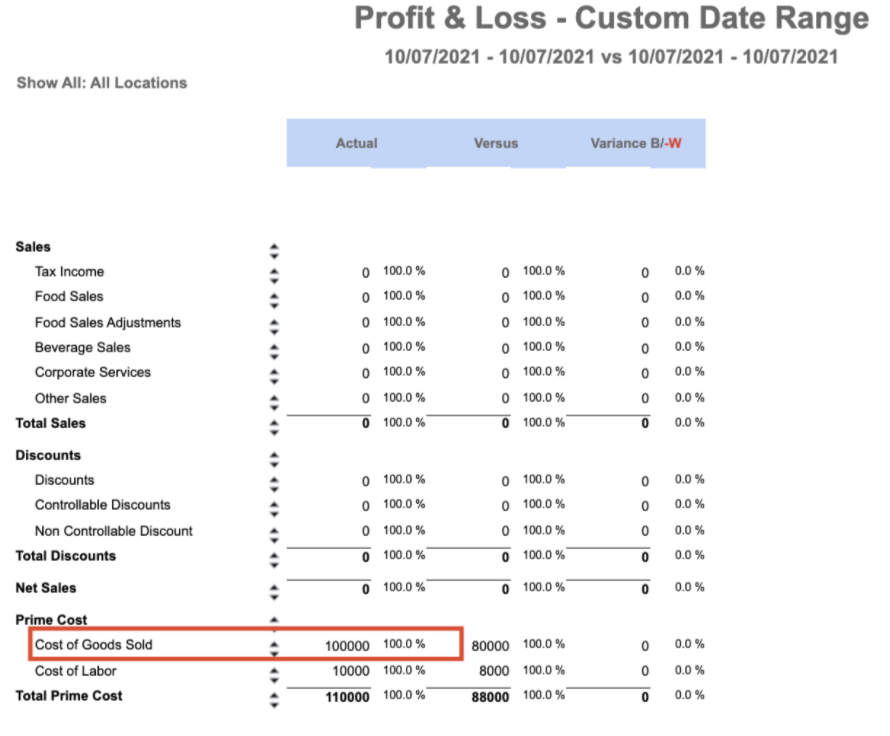
Run the P&L report for a custom date:

Compare to the GL codes you have selected e.g.
Exceptions
None